Simple. Smart. Tested.
MysteryClick helps you run repetitive desktop click routines with a simple setup, reliable time tracking, and optional alarm monitoring.
Set your clicks. Choose your timing. Start when ready.
How it works
Private dashboard
MysteryClick is account-based, so your desktop app, time balance, purchases, download access, history, and support stay connected in one place.
Every new account includes 1 h 30 m of MysteryClick time, so you can try the app before buying anything.
Ready to try MysteryClick?
Unlock your private dashboard and get 1 h 30 m of included time to test your first routines.
It only takes a moment to get started.
Welcome back
Open your private dashboard, download MysteryClick, check your time, and continue where you left off.
Free account
Get your private dashboard, desktop download access, and 1 h 30 m of MysteryClick time included.
E-mail confirmed
Your e-mail address has been confirmed. You can now sign in and open your MysteryClick dashboard.
You are ready to sign in.
Account recovery
Enter your e-mail address and we will send reset instructions if password reset is available for the account.
New password
Set a new password for your MysteryClick account and then sign in again.
Terms and privacy
Simple rules for using MysteryClick. By creating an account, you confirm that you understand and accept these rules.
MysteryClick is a tool for users who want to manage their own repeated desktop click routines. You are fully responsible for how, where, and why you use the program.
You are responsible for your own actions and for any consequences caused by your use of MysteryClick.
We use account information needed to operate MysteryClick: sign-in, e-mail activation, password reset, time balance, MysteryCoins, purchases, desktop sessions, support messages, and security protection.
These rules may be updated at any time. Continued use of MysteryClick means that you accept the current rules.
Your account
Check your MysteryClick access, remaining time, and MysteryCoin balance.
Store
Use MysteryCoins to buy MysteryClick time. Need more MC first? Open the MysteryCoin guide.
Choose a time package and pay with MysteryCoins from your account balance.
Open packagesOpen the guide to see how MysteryCoins are added through Little Corner support.
Time packages
Choose a package, review the final balance, then confirm the purchase.
Contact
Use your account support area when you need help with access, downloads, time packages, MysteryCoins, or purchases.
Support is available from inside your signed-in account so we can connect your message with the correct MysteryClick profile.
Tell us what happened, what you expected, and which part of MysteryClick is affected.
Contact portal
Start a new support conversation or continue an existing one.
Account history
Review your MysteryCoin changes, time purchases, and desktop session activity.
Administrator
Compact read-only admin dashboard. Open details only when you need users, payments, products, assets, security blocks, audit logs, or system status.
Members only
Download the latest Windows installer and follow the setup guide when you are ready to use the desktop app.
Desktop guide
A simple guide to the desktop app: sign in, check your account, set your clicks, use MysteryAlarm, and start only when everything is ready.
Quick start
Download the Windows app, sign in with your MysteryClick account, choose a timing scheme, set your click positions, and start when your setup is ready.
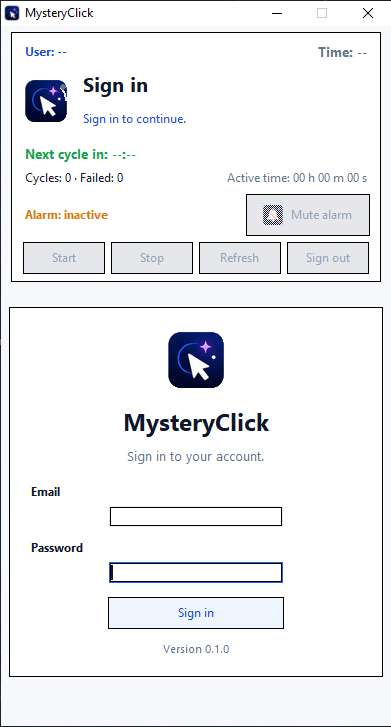
Open MysteryClick on Windows and sign in with the same account you use on this website.
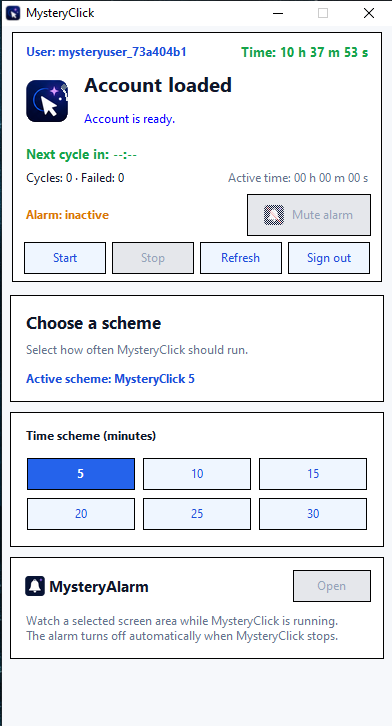
The main panel keeps the important information visible before and during a session.
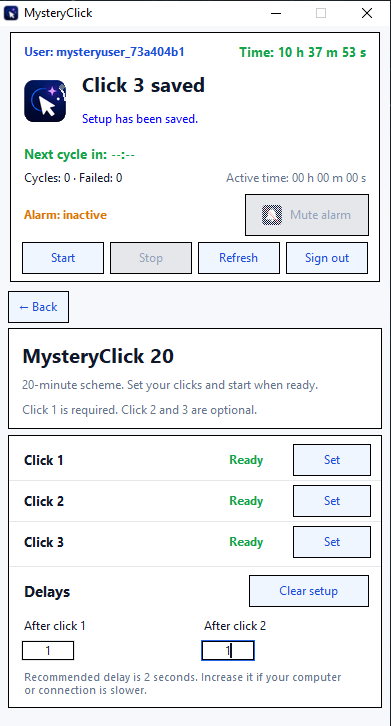
Open Click setup and set the positions MysteryClick should use for the selected timing scheme.
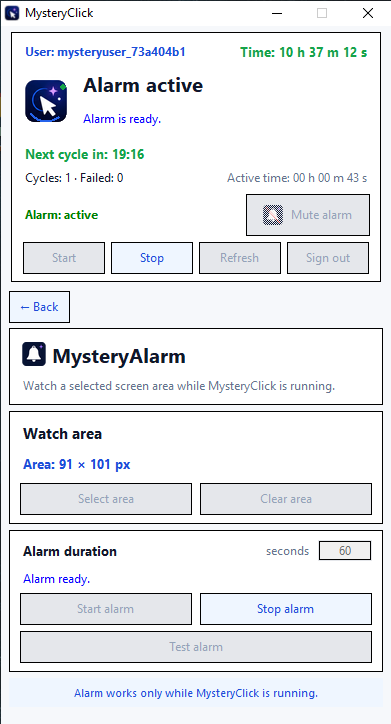
MysteryAlarm can watch a selected screen area while MysteryClick is running and notify you when the situation changes and your attention may be needed.
Ready to run
Before starting, check your remaining time, selected scheme, click positions, and optional MysteryAlarm setup. Keep the desktop app open while MysteryClick is running.
The page you requested does not exist.
Back home